ads

Wednesday, 17 August 2016

JavaScript Alert/Popup on Button Click


Visualforce page code :-


<apex:page standardController="account">

  <apex:includeScript value="{!$Resource.home2}"/>
   <apex:form >
     <br></br>
      Enter Your Name <br></br> <apex:inputField styleClass="text" value="{!account.name}"/>
      <br></br>
       <apex:commandButton value="Show Javascript Alert" styleClass="but1" reRender="abc"/>
   </apex:form>
    
     <script>
        $(document).ready(function(){
          $(".but1").click(function(){
            alert("Hello Mr. "+$(".text").val());
            });
        });
     </script>
</apex:page>

 Output Screen 1 :-


Output Screen 2 :-


Pie Chart In Salesforce


Controller Code :-


public class PicChart{
    public List<PieWedgeData> getPieData() {
        List<PieWedgeData> data = new List<PieWedgeData>();
        data.add(new PieWedgeData('SUNDAY', 30));
        data.add(new PieWedgeData('MONDAY', 55));
        data.add(new PieWedgeData('TUESDAY', 15));
        data.add(new PieWedgeData('WEDNESDAY', 10));
        data.add(new PieWedgeData('tHURSDAY', 20));
        data.add(new PieWedgeData('FRIDAY', 20));
        data.add(new PieWedgeData('SATURDAY', 5));
        return data;
    }

    // Wrapper class
    public class PieWedgeData {

        public String name { get; set; }
        public Integer data { get; set; }

        public PieWedgeData(String name, Integer data) {
            this.name = name;
            this.data = data;
        }
    }
}


Visualfore Page :-


<apex:page controller="PicChart" title="Pie Chart">
    <apex:chart height="350" width="450" data="{!pieData}">
        <apex:pieSeries dataField="data" labelField="name"/>
        <apex:legend position="right"/>
    </apex:chart>
</apex:page>

OutPut Screen 1 :-


Show YouTube Video In Visualforce Page

Go to youtube and open the video you want to show in Visualforce Page.


Step 1  :-  Open your video you want to show in Visualforce page and click on "Share"

Example :- https://www.youtube.com/watch?v=ATajrvvW2CY


Step 2 :-
Now click on "Embed" and Copy the whole "iframe" tag.

<iframe width="420" height="315" src="https://www.youtube.com/embed/ATajrvvW2CY" frameborder="0" allowfullscreen></iframe>

Note :- Remove allowfullscreen , if  its creating issue while saving Visualforce page . So new "iframe" tag will be ..

<iframe width="420" height="315" src="https://www.youtube.com/embed/ATajrvvW2CY" frameborder="0" ></iframe>


Step 3:- Copy this "iframe" tag and Paste into your Visualforce page like below code..


<apex:page >
 <iframe width="420" height="315" src="https://www.youtube.com/embed/ATajrvvW2CY" frameborder="0" ></iframe>
</apex:page>


Step 4:- Your Video is now Ready to view in Visualforce Page.


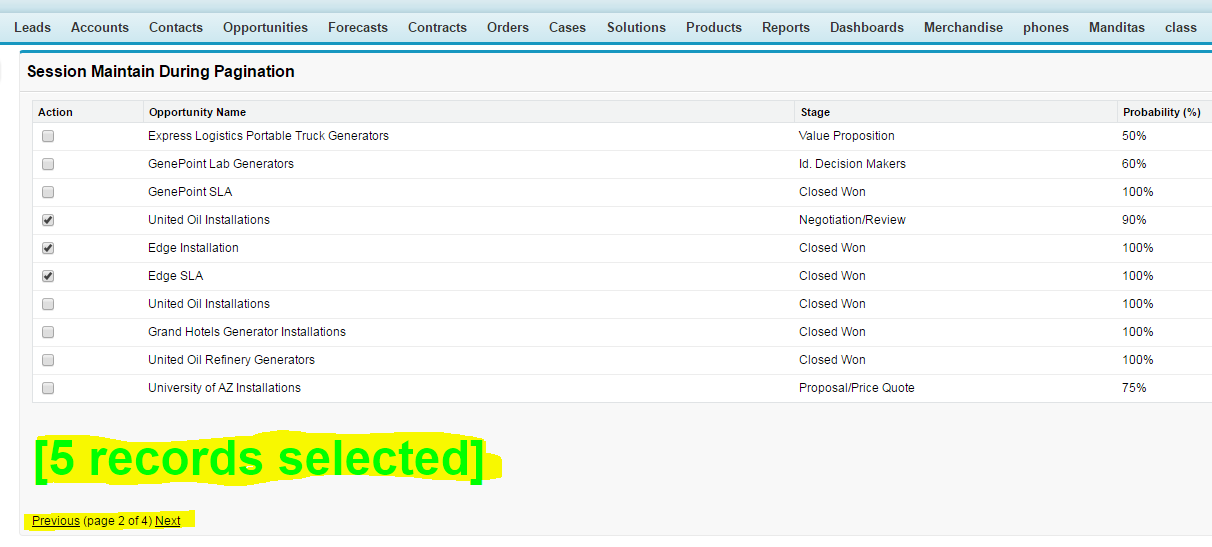
Session Maintain During Pagination In VisualForce Page


Controller Code :-


public with sharing class Session_Maintain_During_Pagination{
 
    /*
    *   item in context from the page
    */
    public String contextItem{get;set;}
 
    /*
    *   set controller
    */
    private ApexPages.StandardSetController setCon;
 
    /*
    *   the opportunity ids selected by the user
    */
    private Set<Id> selectedopportunityIds;
 
    /*
    *   constructor
    */
    public Session_Maintain_During_Pagination()
    {
        //init variable
        this.selectedopportunityIds= new Set<Id>();
 
        //gather data set
        this.setCon= new ApexPages.StandardSetController( [SELECT Id, Name, StageName,probability FROM opportunity] );
        this.setCon.setpageNumber(1);
        this.setCon.setPageSize(10);
 
    }
 
    /*
    *   handle item selected
    */
    public void doSelectItem(){
 
        this.selectedopportunityIds.add(this.contextItem);
 
    }
 
    /*
    *   handle item deselected
    */
    public void doDeselectItem(){
 
        this.selectedopportunityIds.remove(this.contextItem);
 
    }
 
    /*
    *   return count of selected items
    */
    public Integer getSelectedCount(){
 
        return this.selectedopportunityIds.size();
 
    }
 
    /*
    *   advance to next page
    */
    public void doNext(){
 
        if(this.setCon.getHasNext())
            this.setCon.next();
 
    }
 
    /*
    *   advance to previous page
    */
    public void doPrevious(){
 
        if(this.setCon.getHasPrevious())
            this.setCon.previous();
 
    }
 
    /*
    *   return current page of groups
    */
    public List<CCWRowItem> getopportunity(){
 
        List<CCWRowItem> rows = new List<CCWRowItem>();
 
        for(sObject r : this.setCon.getRecords()){
            opportunity c = (opportunity)r;
 
            CCWRowItem row = new CCWRowItem(c,false);
            if(this.selectedopportunityIds.contains(c.Id)){
                row.IsSelected=true;
            }
            else{
                row.IsSelected=false;
            }
            rows.add(row);
        }
 
        return rows;
 
    }
 
    /*
    *   return whether previous page exists
    */
    public Boolean getHasPrevious(){
 
        return this.setCon.getHasPrevious();
 
    }
 
    /*
    *   return whether next page exists
    */
    public Boolean getHasNext(){
 
        return this.setCon.getHasNext();
 
    }
 
    /*
    *   return page number
    */
    public Integer getPageNumber(){
 
        return this.setCon.getPageNumber();
 
    }
 
    /*
    *    return total pages
    */
    Public Integer getTotalPages(){
 
        Decimal totalSize = this.setCon.getResultSize();
        Decimal pageSize = this.setCon.getPageSize();
 
        Decimal pages = totalSize/pageSize;
 
        return (Integer)pages.round(System.RoundingMode.CEILING);
    }
 
    /*
    *   helper class that represents a row
    */
    public with sharing class CCWRowItem{
 
        public opportunity topportunity{get;set;}
        public Boolean IsSelected{get;set;}
 
        public CCWRowItem(opportunity c, Boolean s){
            this.topportunity=c;
            this.IsSelected=s;
        }
 
    }
}


Visualforce Page :-


<apex:page controller="Session_Maintain_During_Pagination">
 
    <script type="text/javascript">
 
        /*
        *    function to handle checkbox selection
        */
        function doCheckboxChange(cb,itemId){
 
            if(cb.checked==true){
                aSelectItem(itemId);
            }
            else{
                aDeselectItem(itemId);
            }
 
        }
 
    </script>
 
    <apex:form >
 
        <!-- handle selected item -->
        <apex:actionFunction name="aSelectItem" action="{!doSelectItem}" rerender="mpb">
            <apex:param name="contextItem" value="" assignTo="{!contextItem}"/>
        </apex:actionFunction>
 
        <!-- handle deselected item -->
        <apex:actionFunction name="aDeselectItem" action="{!doDeselectItem}" rerender="mpb">
            <apex:param name="contextItem" value="" assignTo="{!contextItem}"/>
        </apex:actionFunction>
 
        <apex:pageBlock title="Session Maintain During Pagination" id="mpb">
 
            <!-- table of data -->
            <apex:pageBlockTable title="opportunity" value="{!opportunity}" var="c">
                <apex:column >
                    <apex:facet name="header">Action</apex:facet>
                    <apex:inputCheckbox value="{!c.IsSelected}" onchange="doCheckboxChange(this,'{!c.topportunity.Id}')"/>
                </apex:column>
                <apex:column value="{!c.topportunity.Name}"/>
                <apex:column value="{!c.topportunity.StageName}"/>
                <apex:column value="{!c.topportunity.Probability}"/>
              
            </apex:pageBlockTable>
 <br></br><br></br>
            <!-- count of selected items -->
          <b>  <font size="7" color="#00ff00"> <apex:outputLabel value="[{!selectedCount} records selected]" /></font></b>
 
            <br/><br></br><br></br>
 
            <!-- next, previous and page info -->
            <apex:commandLink action="{!doPrevious}" rendered="{!hasPrevious}" value="Previous" />
            <apex:outputLabel rendered="{!NOT(hasPrevious)}" value="Previous" />
 
            <apex:outputLabel value=" (page {!pageNumber} of {!totalPages}) " />
 
            <apex:commandLink action="{!doNext}" rendered="{!hasNext}" value="Next" />
            <apex:outputLabel rendered="{!NOT(hasNext)}" value="Next" />
 
        </apex:pageBlock>
 
    </apex:form>
 
</apex:page>

Output Screen 1 :-


Output Screen 2 :-


Output Screen 3 :-


Enable/disable an input field Based on Picklist Value


Controller Code :-


public class Sampletest
{
    public String State {get;set;}
    public String District{get;set;}
    public Boolean StateBool {get;set;}
    
    public sampletest()
    {        
        State  = 'none';
        if(State == 'none')
        {
         StateBool = true;
        }    
    }
    
    public void StateBool()
    {        
        if(State != 'none')
        {
            StateBool = false;
        }
        else
        {
            StateBool = true; 
        } 
    }
       
}


Visualforce Page :-


<apex:page controller="Sampletest">
<apex:form >
<apex:actionFunction name="changeBoolCall" action="{!StateBool}"/>
    <apex:pageblock id="pg">
        <apex:pageblockSection >
            <apex:pageblockSectionItem >
                Select State :-
            </apex:pageblockSectionItem>
            <apex:pageblockSectionItem >
               <apex:selectList value="{!State}" size="1" multiselect="false">
                   <apex:selectOption itemLabel="--- None ---" itemValue="none"/>
                   <apex:selectOption itemLabel="Karnataka" itemValue="inr"/>
                   <apex:selectOption itemLabel="Rajasthan" itemValue="inr"/>
                   <apex:actionSupport event="onchange" action="{!StateBool}" reRender="pg"/>
               </apex:selectList>
            </apex:pageblockSectionItem>            
            <apex:pageblockSectionItem >
                Enter the District:-
            </apex:pageblockSectionItem>      
            <apex:pageblockSectionItem >
               <apex:inputtext value="{!District}" disabled="{!StateBool}"/>
            </apex:pageblockSectionItem>                   
        </apex:pageblockSection>
    </apex:pageblock>
</apex:form>    
</apex:page>


Screenshot 1 :-


Screenshot 2:-


Auto Complete Using Jave Script In Visualforce Page


To Execute below code you need to create new Object with below structure :-


Insert Some Records  :-


Controller Code : -


public with sharing class AutoComplete{

        public String empValue {get;set;}
        
    public AutoComplete(ApexPages.StandardController controller){
    }
    
    public list<Employee__c> getEmployeeList(){
        return [select id, Name from Employee__c];
    }  
}

Visuslforce Page :-

<apex:page standardController="Employee__c" extensions="AutoComplete" docType="HTML-5.0" >
 
         <script src="https://code.jquery.com/jquery-1.8.2.js"></script>
         <script src="https://code.jquery.com/ui/1.9.0/jquery-ui.js"></script>
         <link rel="stylesheet" href="https://code.jquery.com/ui/1.9.1/themes/base/jquery-ui.css"/>
         
        <script type="text/javascript"> var j$ = jQuery.noConflict();
          var apexEmployeeList =[];
           <apex:repeat value="{!employeeList}" var="appList">           
              apexEmployeeList.push('{!appList.name}');           
          </apex:repeat>
          //on Document ready
          j$(document).ready(function(){
              j$(".apexemployeeautocomplete").autocomplete({
                  source : apexEmployeeList
           }); 
            j$("#button").click(function(){
              alert('somevalue');
             // var obj = document.getElementById("{!$Component.form.panel.apexemployeeautocomplete}");
              alert(obj);
              });  
       
          });  
        </script>
       
<apex:form >
<apex:pageBlock >
     <b>Employee</b>&nbsp;
       <apex:inputtext label="Employee"  styleClass="apexemployeeautocomplete" value="{!empValue}"  />
</apex:pageBlock>
</apex:form>
</apex:page>


OutPut Screen 1 :-


Output Screen 2 :-


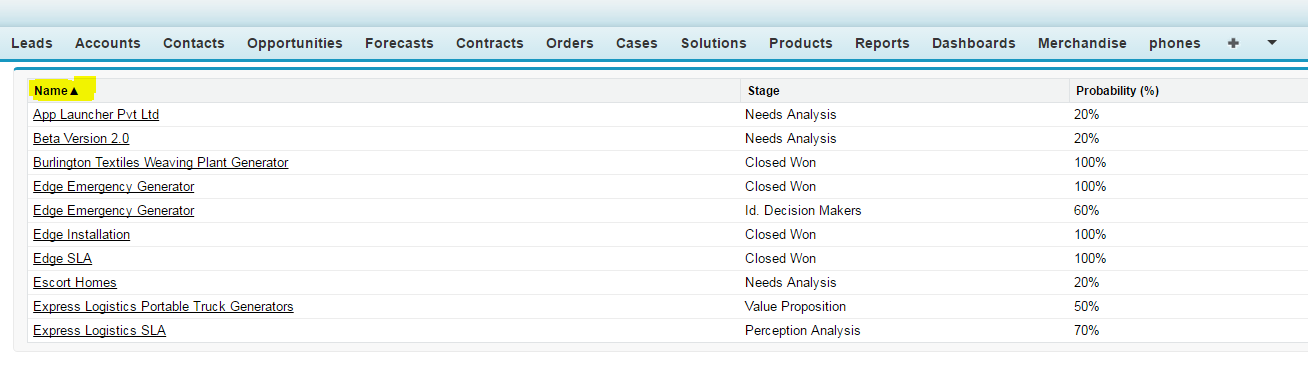
Shorting Records Based on Alphabet in Visualforce Page


Controller Code : -


public with sharing class OpportunitySortingController {
  
    private list<opportunitySubClass> opportunityList {get; set;}
    private set<Id> opportunitySelectedSet;
    public Integer opportunitySelectedCount {get; set;}
    public String SelectedOneopportunity {get; set;}
    
   
    public list<String> AlphaList {get; set;}
    public String AlphaFilter {get; set;}
    public String SearchName {get; set;}
    public String SearchBillingAddress {get; set;} 
    private String SaveSearchName;
    private String SaveSearchBillingAddress;
    private String Queryopportunity;
    
 
    public String RecPerPage {get; set;}
    public list<SelectOption> RecPerPageOption {get; set;}  
    public String SortFieldSave;
    
   
    public OpportunitySortingController(){
        opportunityList = new list<opportunitySubClass>();
        opportunitySelectedSet = new set<Id>();
        
    
        RecPerPageOption = new list<SelectOption>();
        RecPerPageOption.add(new SelectOption('10','10'));
        RecPerPageOption.add(new SelectOption('25','25'));
        RecPerPageOption.add(new SelectOption('50','50'));
        RecPerPageOption.add(new SelectOption('100','100'));
        RecPerPageOption.add(new SelectOption('200','200'));
        RecPerPage = '10'; 
        
        AlphaList = new list<String> {'A', 'B', 'C', 'D', 'E', 'F', 'G', 'H', 'I', 'J', 'K', 'L', 'M', 'N', 'O', 'P', 'Q', 'R', 'S', 'T', 'U', 'V', 'W', 'X', 'Y', 'Z', 'Other', 'All'};
            SortFieldSave = SortField;
        
     
        if (apexpages.currentpage().getparameters().get('alpha') == null) {
            AlphaFilter = 'All';
        } else {
            AlphaFilter = apexpages.currentpage().getparameters().get('alpha');
        }
      
        BuildQuery();  
    }
    
    public ApexPages.StandardSetController StdSetControlleropportunity {
        get {
            if(StdSetControlleropportunity == null) {
                StdSetControlleropportunity = new ApexPages.StandardSetController(Database.getQueryLocator(Queryopportunity));
               
                StdSetControlleropportunity.setPageSize(Integer.valueOf(RecPerPage));
            }
            return StdSetControlleropportunity;
        }
        set;
    }
  
    public list<opportunitySubClass> getCurrentopportunityList() {
        UpdateopportunitySelectedSet();
        
        opportunityList = new list<opportunitySubClass>();
        for (opportunity a : (list<opportunity>)StdSetControlleropportunity.getRecords()) {
            opportunityList.add(new opportunitySubClass(a, opportunitySelectedSet.contains(a.Id)));
        }
        return opportunityList;
    }
    
    public void UpdateopportunitySelectedSet(){
        for(opportunitySubClass a : opportunityList ){
            if(a.aCheckBox == true) {
                opportunitySelectedSet.add(a.aopportunity.Id);
            } else {
                if(opportunitySelectedSet.contains(a.aopportunity.Id)) {
                    opportunitySelectedSet.remove(a.aopportunity.Id);
                }
            }
        }  
        opportunitySelectedCount = opportunitySelectedSet.size();
    }
    
   
    public PageReference Searchopportunity() {
        SaveSearchName = SearchName;
        SaveSearchBillingAddress = SearchBillingAddress;
        
        BuildQuery();
        
        return null;
    }
    
    
    public void BuildQuery() {
        StdSetControlleropportunity = null;
        String QueryWhere = '';
        
        if (AlphaFilter == null || AlphaFilter.trim().length() == 0) {
            AlphaFilter = 'All';
        }
        
        Queryopportunity = 'SELECT Id, Name, StageName, Probability ' +
            ' FROM opportunity'; 
        
        if (AlphaFilter == 'Other') {
            QueryWhere = BuildWhere(QueryWhere, '(' + String.escapeSingleQuotes(SortField) + ' < \'A\' OR ' + 
                                    String.escapeSingleQuotes(SortField) + ' > \'Z\') AND (NOT ' + 
                                    String.escapeSingleQuotes(SortField) + ' LIKE \'Z%\') ');
        } else if (AlphaFilter != 'All') {
            QueryWhere = BuildWhere(QueryWhere, '(' + String.escapeSingleQuotes(SortField) + ' LIKE \'' + String.escapeSingleQuotes(AlphaFilter) + '%\')' );
        }
        
        if (SaveSearchName != null) {
            QueryWhere = BuildWhere(QueryWhere, ' (Name LIKE \'%' + String.escapeSingleQuotes(SaveSearchName) + '%\')');
        }
        if (SaveSearchBillingAddress != null) {
            QueryWhere = BuildWhere(QueryWhere, '((BillingStreet LIKE \'%' + String.escapeSingleQuotes(SaveSearchBillingAddress) + '%\') or' +
                                    ' (BillingCity LIKE \'%' + String.escapeSingleQuotes(SaveSearchBillingAddress) + '%\') or' +
                                    ' (BillingState LIKE \'%' + String.escapeSingleQuotes(SaveSearchBillingAddress) + '%\') or' +
                                    ' (BillingPostalCode LIKE \'%' + String.escapeSingleQuotes(SaveSearchBillingAddress) + '%\') or' +
                                    ' (BillingCountry LIKE \'%' + String.escapeSingleQuotes(SaveSearchBillingAddress) + '%\'))');
        }
        
        Queryopportunity += QueryWhere;
        Queryopportunity += ' ORDER BY ' + String.escapeSingleQuotes(SortField) + ' ' + String.escapeSingleQuotes(SortDirection) + ' LIMIT 10000';
        
        system.debug('Queryopportunity:' + Queryopportunity);
    }
    
   
    public String BuildWhere(String QW, String Cond) {
        if (QW == '') {
            return ' WHERE ' + Cond;
        } else {
            return QW + ' AND ' + Cond;
        }
    }
    
    public String SortDirection {
        get { if (SortDirection == null) {  SortDirection = 'asc'; } return SortDirection;  }
        set;
    }
    
   
    public String SortField {
        get { if (SortField == null) {SortField = 'Name'; } return SortField;  }
        set; 
    }
    
  
    public void SortToggle() {
        SortDirection = SortDirection.equals('asc') ? 'desc NULLS LAST' : 'asc';
       
        if (SortFieldSave != SortField) {
            SortDirection = 'asc';
            AlphaFilter = 'All';
            SortFieldSave = SortField;
        }
    
        BuildQuery();
    }
    
 
    public PageReference DoSomethingOne() {
        system.debug('SelectedOneopportunity: ' + SelectedOneopportunity);
        return null;
    }
   
    public PageReference DoSomethingMany() {
        for (Id opportunityId : opportunitySelectedSet) {
            system.debug('Checked: ' + opportunityId);
        }
        return null;
    }
    
  
    public class opportunitySubClass {
        public Boolean aCheckBox {get;set;}
        public opportunity aopportunity {get;set;}
        
      
        public opportunitySubClass(opportunity a, Boolean chk){
            aopportunity = a;
            aCheckBox = chk;
        }
    }
}


Visualforce Page :-


<apex:page controller="OpportunitySortingController">
   <apex:form >
      
      <apex:pageBlock id="TablePanel">
        
 
         <apex:actionStatus id="TableUpdateStatus">
            <apex:facet name="stop">
               <apex:pageBlockTable value="{!CurrentopportunityList}" var="a">                  
                  <apex:column >
                     <apex:facet name="header">
                        <apex:commandLink action="{!SortToggle}" rerender="TablePanel" status="TableUpdateStatus">
                           <apex:param name="SortField" value="Name" assignTo="{!SortField}" />
                           <apex:outputText value="{!$ObjectType.opportunity.Fields.Name.Label}{!IF(SortField=='Name',IF(SortDirection='asc','▲','▼'),'')}" />
                        </apex:commandLink>
                     </apex:facet>
                     <apex:outputLink value="/{!a.aopportunity.Id}" target="_blank">{!a.aopportunity.Name}</apex:outputlink>
                  </apex:column>
                  <apex:column >
                     <apex:facet name="header">
                        <apex:commandLink action="{!SortToggle}" rerender="TablePanel" status="TableUpdateStatus">
                           <apex:param name="SortField" value="StageName" assignTo="{!SortField}" />
                           <apex:outputText value="{!$ObjectType.opportunity.Fields.StageName.Label}{!IF(SortField=='StageName',IF(SortDirection='asc','▲','▼'),'')}" />
                        </apex:commandLink>
                     </apex:facet>
                     <apex:outputField value="{!a.aopportunity.StageName}" />
                  </apex:column>
                  <apex:column >
                     <apex:facet name="header">
                        <apex:commandLink action="{!SortToggle}" rerender="TablePanel" status="TableUpdateStatus">
                           <apex:param name="SortField" value="Probability" assignTo="{!SortField}" />
                           <apex:outputText value="{!$ObjectType.opportunity.Fields.Probability.Label}{!IF(SortField=='Probability',IF(SortDirection='asc','▲','▼'),'')}" />
                        </apex:commandLink>
                     </apex:facet>
                     <apex:outputField value="{!a.aopportunity.Probability}" />
                  </apex:column>                 
               </apex:pageBlockTable>
            </apex:facet>
         </apex:actionStatus>
      </apex:pageBlock>
   </apex:form>
</apex:page>


OutPut Screen 1 :-


OutPut Screen 2 :-


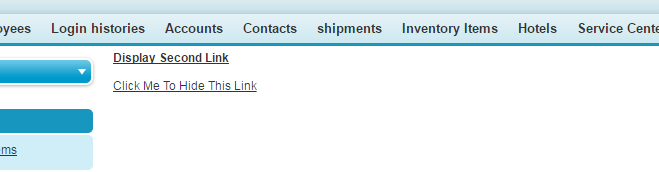
Show / Hide Component In VisualForce Page


Controller Code :-


public class popup
{
  public boolean ShowPopup {get; set;}

  public void HidePopup()
  {
    ShowPopup= false;
  }

  public void showPopup()
  {
    ShowPopup= true;
  }
}

VisualForce Page :-


<apex:page controller="popup">
   <apex:form >
     <B>
    <apex:commandlink value="Display Second Link" action="{!showPopup}"/>
    </B><br></br><br></br>
    <apex:outputPanel layout="block" rendered="{!ShowPopup}">
     <apex:commandlink value="Click Me To Hide This Link" action="{!HidePopup}"/>
    </apex:outputPanel>
   </apex:form>
</apex:page>


OutPut Screen 1:-


OutPut Screen 2 :-


PopUp Box In Visualforce Page


Controller Code :-


public with sharing class TestPopup {
    public Boolean displayPopup {get;set;}
    public TestPopup(ApexPages.StandardController controller) {}
    public void showPopup() {
        displayPopup = true;
    }
    public void closePopup() {
        displayPopup = false;
    }
    public PageReference redirectPopup() {
        displayPopup = false;
        return null;
    }
}

Visuslforce Page :-


<apex:page standardController="Account" extensions="TestPopup" sidebar="false" showheader="false">
<apex:form >
<apex:pageBlock >
<table align ="center" >
  <tr><td>
   
<apex:commandButton value="Display PopUp Message" action="{!showPopup}" rerender="popup" status="status"/>
</td></tr>
</table>
 <br></br> <br></br> <br></br> <br></br> <br></br> <br></br> <br></br> <br></br> <br></br> <br></br> <br></br> <br></br> 
 
 
             <apex:outputPanel id="popup">
             
                <apex:outputPanel id="popInnerOutputPnl" styleClass="customPopup" layout="block" rendered="{!displayPopUp}">
                     <apex:commandButton value="X" title="Close the popup" action="{!closePopup}" styleClass="closeButton" rerender="popup">
                     </apex:commandButton>
                     <br></br><br></br>
                     Boost your productivity by working on the go. Learn how to add your email account to
                           your mobile device, and how to set up popular Office apps like Word, Excel, PowerPoint, and OneNote on your tablet or smart phone.
                           To get started, choose your mobile device's operating system . 
                    
                     <br></br>
                     <apex:commandButton value="Ok" action="{!redirectPopup}" styleClass="closeButton" rerender="popup">
                     </apex:commandButton>
                </apex:outputPanel>
       
            </apex:outputPanel>
       
 
            </apex:pageBlock>
              </apex:form>
                  <style type="text/css">
.customPopup {
    background-color: white;
    border-style: solid;
    border-width: 2px;
    left: 20%;
    padding: 10px;
    position: absolute;
    z-index: 9999;
    width: 300px;
    top: 20%;
}
.disabledTextBox {
    background-color: white;
  border: 1px solid;
    color: black;
    cursor: default;
    width: 90px;
    display: table;
    padding: 2px 1px;
    text-align:right;
}  
.closeButton {
    float: right;
}
</style>
</apex:page>


Output Screen 1 :-


Output Screen 2 :-


Other PopUp Examples :-
http://sforceforyou.blogspot.in/2016/08/popup-box-in-visualforce-page.html