ads

Tuesday, 16 August 2016

Dependent Picklist In Visualforce Page


Controller Code : -


Public Class DependentPickListController {

    Public String Country{get;set;}
    Public String State{get;set;}

    Public List <SelectOption> getCountries() {
        List <SelectOption> Options = New List <SelectOption> ();
        Options.add(new SelectOption('None','None'));
        Options.add(new SelectOption('IN','India'));
        Options.add(new SelectOption('US','United States'));
        Options.add(new SelectOption('UK','United Kingdom'));
        Return Options;
    }
    Public List < SelectOption > getStates() {
        List < SelectOption > Options = New List< SelectOption > ();
        if (Country == 'IN') {

            Options.add(new SelectOption('DL','Delhi'));
            Options.add(new SelectOption('MP','Madya Pradesh'));
            Options.add(new SelectOption('JK','Jammu Kashmir'));
            
        } else if (Country == 'US') {

            Options.add(new SelectOption('AL', 'Alabama'));
            Options.add(new SelectOption('ALK', 'Alaska'));
            Options.add(new SelectOption('CL', 'California'));
            
        } else if (Country == 'UK') {

            Options.add(new SelectOption('BR', 'Bristol'));
            Options.add(new SelectOption('CM', 'Cambridge'));
            Options.add(new SelectOption('CH', 'Chester'));
            
        } else {
            Options.add(new SelectOption('None', 'None'));
        }
        Return Options;
    }

}


Visualforce Page Code :-


<apex:page controller="DependentPickListController">
    <apex:form >
        <apex:pageblock >
            <apex:pageblockSection columns="2">
                <apex:pageBlockSectionItem >
                    <apex:outputLabel value="Country" />
                </apex:pageBlockSectionItem>
                <apex:pageBlockSectionItem >
                    <apex:selectList size="1" value="{!Country}">
                        <apex:selectOptions value="{!Countries}" />
                        <apex:actionSupport event="onchange" rerender="id1" />
                    </apex:selectList>
                </apex:pageBlockSectionItem>
                <apex:pageblockSectionItem >
                    <apex:outputLabel value="State " />
                </apex:pageblockSectionItem>
                <apex:pageBlockSectionItem >
                    <apex:selectList size="1" value="{!State }" id="id1" >
                        <apex:selectOptions value="{!States}" />
                       
                    </apex:selectList>
                </apex:pageBlockSectionItem>
            </apex:pageblockSection>
        </apex:pageblock>
    </apex:form>
</apex:page>


Output Screen 1 :-


Stylish PopUp Box In Visualforce Page


VisualForce Page Code :-


<apex:page sidebar="false" standardStylesheets="false" showHeader="false">
<head>
    <link rel="stylesheet" href="//netdna.bootstrapcdn.com/bootstrap/3.1.1/css/bootstrap.min.css" />
    <link rel="stylesheet" media="print" href="//netdna.bootstrapcdn.com/bootstrap/3.1.1/css/bootstrap.min.css" />
    <script src="//ajax.googleapis.com/ajax/libs/jquery/1.11.0/jquery.min.js"></script>
    <script src="//netdna.bootstrapcdn.com/bootstrap/3.1.1/js/bootstrap.min.js"></script>
</head>   
<br></br><br></br><br></br><br></br><br></br>
<table align ="center" >
  <tr><td>
<!-- Button trigger modal -->
<button class="btn btn-primary btn-lg" data-toggle="modal" data-target="#myModal">
  PopUp Instructions
</button>
</td></tr>
   </table>
<!-- Modal -->
<div class="modal fade" id="myModal" tabindex="-1" role="dialog" aria-labelledby="myModalLabel" aria-hidden="true">
  <div class="modal-dialog">
    <div class="modal-content">
      <div class="modal-header">
        <button type="button" class="close" data-dismiss="modal"><span aria-hidden="true">&times;</span><span class="sr-only">Close</span></button>
        <h4 class="modal-title" id="myModalLabel"> Instructions </h4>
      </div>
      <div class="modal-body">
      When you turn on a new iOS device or after youve completed the update to the latest version of iOS, follow the instructions in the setup assistant to activate your device and set up iCloud.1
      If you skipped the setup process, tap the Settings icon on the Home screen, select iCloud, then enter your Apple ID.
      Want to use a different Apple ID for iTunes?
      </div>
      <div class="modal-footer">
        <button type="button" class="btn btn-default" data-dismiss="modal">Close</button>
        
      </div>
    </div>
  </div>
</div>


</apex:page>

OutPut Screen 1 :-


OutPut Screen 2 :-


 Other PopUp Examples :-

http://sforceforyou.blogspot.in/2016/08/popup-box-in-visualforce-page_17.html

Using Static Resource In VisualForce Page


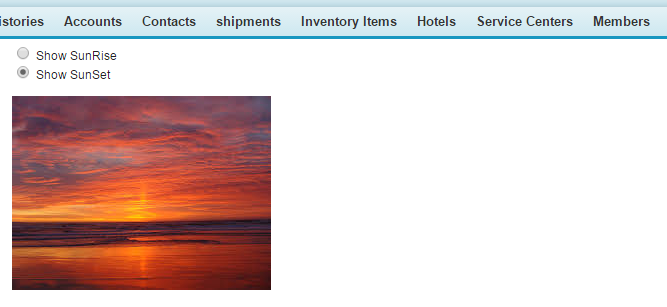
OutPut Screen : -


Static Resource 1 :-


Static Resource 2 :-


Visualforce Page Code :-


<apex:page >
<apex:form >
<script>   
        function check_value(fieldvalue) { 
 
      switch (fieldvalue) {
            case 1:                document.getElementById("oImg").src='{!URLFOR($Resource.Sunrise)}';
            
                break;
            case 2:                document.getElementById("oImg").src='{!URLFOR($Resource.Sunset)}';
                break;          
            }
        }          
</script>
<form name="builder">
  <input type="radio" name="field" value="one" onclick='check_value(1)'/> Show SunRise<br />
  <input type="radio" name="field" value="two" onclick='check_value(2)'/> Show SunSet<br />
</form>
&nbsp;&nbsp;&nbsp;&nbsp;&nbsp;&nbsp;&nbsp;&nbsp;&nbsp;&nbsp;&nbsp;&nbsp;&nbsp;&nbsp;

<div id="imagedest">
    <img src="" id="oImg"/>
</div>

</apex:form>
</apex:page>

VisualForce Page :-


Calculator Using Visualforce page


Controller Code :-


public class Calculator {

    Public Integer Number1{get;set;}
    Public Integer Number2{get;set;}
    Public integer Result{get;set;}

    public PageReference Subtraction() {
        Result= Number1 - Number2;
        return null;
    }


    public PageReference Addition() {
        Result= Number1 + Number2;
        return null;
    }
    
    public PageReference Division() {
        Result= Number1 / Number2;
        return null;
    }
    
    public PageReference Multiplication() {
        Result= Number1 * Number2;
        return null;
    }


}

Visualforce Page :-


<apex:page controller="Calculator">
  <apex:form >
  <apex:pageBlock >
  <apex:pageBlockButtons >
  <apex:commandButton value="Add" action="{!Addition}" reRender="refresh"/>
  <apex:commandButton value="Sub" action="{!Subtraction}" reRender="refresh"/>
  <apex:commandButton value="Divide" action="{!Division}" reRender="refresh"/>
  <apex:commandButton value="Multiply" action="{!Multiplication}" reRender="refresh"/>
  
  </apex:pageBlockButtons>
  <apex:outputPanel id="refresh">
  <apex:pageBlockSection columns="2">
  <apex:outputLabel value="Number 1"/>
  <apex:inputText value="{!Number1}"/>
  <apex:outputLabel value="Number 2"/>
  <apex:inputText value="{!Number2}"/>
  <apex:outputLabel value="Result"/>
  <apex:inputText value="{!Result}"/>
  </apex:pageBlockSection>
  </apex:outputPanel>
  </apex:pageBlock>
  </apex:form>
</apex:page>


OutPut Screen 1 :-


Alphabetic Pagination in Visualforce Page


Controller Code :-


public class AlphabeticPagination {

    public List < String > SerchAlphabet {get;set;}
    public String SearchVar {get;set;}
    public list < Opportunity> Opp{get;set;}
    public list < Opportunity> ShowOpp {get;set;}
    public integer sizee {get;set;}
    public AlphabeticPagination ()
    {
        SerchAlphabet = new List < string > {'A', 'B', 'C', 'D', 'E', 'F', 'G', 'H', 'I', 'J', 'K', 'L', 'M', 'N', 'O', 'P', 'Q', 'R', 'S', 'T', 'U', 'V', 'W', 'X', 'Y', 'Z', 'All'};
    Opp = new List < Opportunity> ();
        Opp = [SELECT name, CloseDate, Amount from Opportunity order by Name];
        SearchVar = 'All';
        ShowOpp = new List < Opportunity> ();
        for (Opportunity a: Opp)
        {
            if (SearchVar.equals('All'))
                ShowOpp.add(a);
            else
            if (a.Name.startsWith(SearchVar.toLowerCase()) || a.Name.startsWith(SearchVar))
                ShowOpp.add(a);
        }
        sizee = ShowOpp.size();
    }
    public PageReference display()
    {
        ShowOpp.clear();
        for (Opportunity a: Opp)
       {
            if (SearchVar.equals('All'))
                ShowOpp.add(a);
            else
            if (a.Name.startsWith(SearchVar.toLowerCase()) || a.Name.startsWith(SearchVar))
            {
                ShowOpp.add(a);
            }
        }
        sizee = ShowOpp.size();
        return null;
    }
}

Visualforce Page :-


<apex:page controller="AlphabeticPagination">
  <apex:form >
   <apex:pageBlock title="Opportunities">
             <table>
                <tr>
                <apex:repeat value="{!SerchAlphabet}" var="nn">
                    <td><apex:commandLink action="{!display}" reRender="pg" ><apex:param value="{!nn}" name="sss" assignTo="{!SearchVar}"/> {!nn}</apex:commandLink></td>
                    </apex:repeat>
                </tr>
            </table>
            <apex:outputpanel id="pg">
               <div id="showdata">
                    <apex:pageBlockTable value="{!ShowOpp}" var="k">
                    <apex:column headerValue="Name" value="{!k.name}"/>
                    <apex:column headerValue="Close Date" value="{!k.Closedate}"/>
                    <apex:column headerValue="Amount" value="{!k.Amount}"/>
                    </apex:pageBlockTable>
                    </div>
                    <div id="nodata" style = "display:none;">
                    <p><b>No record by selected letter.</b></p>
                </div>
               <script>
                    var sze='{!sizee}';
                    sz=parseInt(sze);
                    
                    if(sz>0)
                    {
                        document.getElementById('showdata').style.display="block";
                        document.getElementById('nodata').style.display="none";
                    }
                    else
                    {
                        document.getElementById('showdata').style.display="none";
                        document.getElementById('nodata').style.display="block";
                    }
              </script> 
          </apex:outputpanel>
   </apex:pageBlock>
  </apex:form>
</apex:page>

Screenshot 1 :-


Screenshot 2 :-


Pagination In Visualforce Page (First Page ,Next,Previous,Last Page)


Controller Code :- 


public class PaginationControllerOpportunity {
    
    Public integer TotalRecordCount=0;
    Public Integer Offsetsize=0;
    Public Integer LimitSize=10;
    
    Public PaginationControllerOpportunity (){
    TotalRecordCount=[Select count() From opportunity];
    }
    
    public boolean getNxt() {
    if((OffsetSize + LimitSize) > TotalRecordCount)
    return true;
    else
    return false;
    }
    
    public boolean getPrev() {
    if(Offsetsize==0)
    return true;
    else
    return false;   
    }

    public void LastPage() {
    Offsetsize = TotalRecordCount - math.mod(TotalRecordCount,LimitSize);
    }

    public void Next() {
      Offsetsize=Offsetsize+LimitSize;
    }

    public void Previous() {
      Offsetsize=Offsetsize-LimitSize;
    }
    
    public void FirstPage() {
     Offsetsize=0;     
    }
  
   
    public List<opportunity> getopplist(){
    List<opportunity> opp= Database.Query('SELECT Name, StageName, CloseDate FROM opportunity LIMIT :LimitSize OFFSET :OffsetSize');
    return opp;
    }
}

VisualForce Page Code :-


<apex:page controller="PaginationControllerOpportunity">
    <apex:form >
        <apex:pageBlock title="All Opportunity Details" id="BlockId">
            <apex:pageBlockTable value="{!Opplist}" var="Opp">
                <apex:column value="{!Opp.name}" />
                <apex:column value="{!Opp.StageName}" />
                <apex:column value="{!Opp.CloseDate }" />
            </apex:pageBlockTable>
            <apex:pageBlockButtons >
                <apex:commandButton action="{!FirstPage}" value="First Page" rerender="BlockId" disabled="{!Prev}" />
                <apex:commandButton action="{!Previous}" value="Previous" rerender="BlockId" disabled="{!Prev}" />
                <apex:commandButton action="{!Next}" value="Next" rerender="BlockId" disabled="{!Nxt}" />
                <apex:commandButton action="{!LastPage}" value="Last Page" rerender="BlockId" disabled="{!Nxt}" />
            </apex:pageBlockButtons>
        </apex:pageBlock>
    </apex:form>
</apex:page>

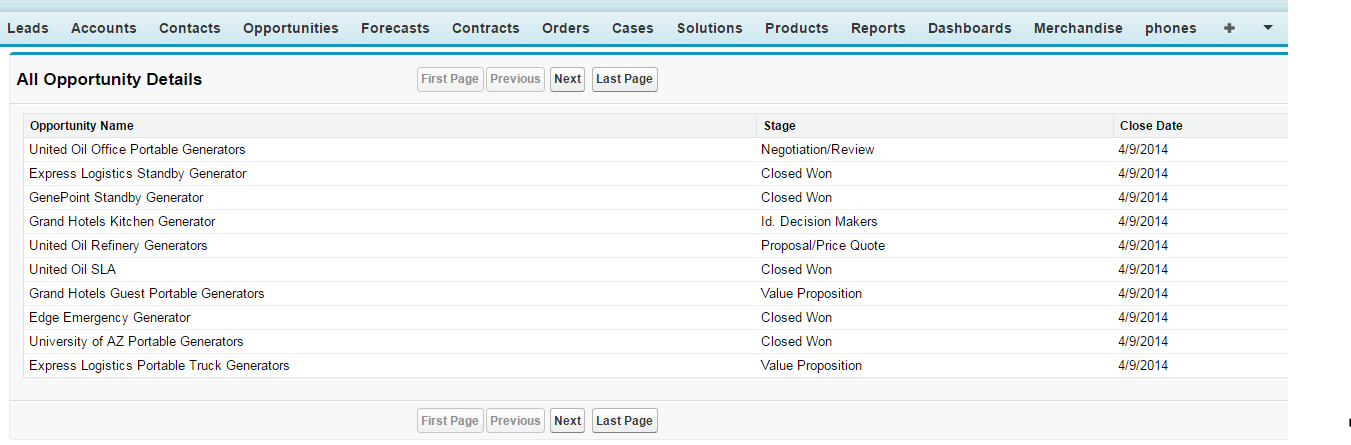
Screenshot 1 :-


Pagination In Salesforce (First Page ,Next,Previous,Last Page)


Controller Code :- 


public class PaginationControllerOpportunity {
    
    Public integer TotalRecordCount=0;
    Public Integer Offsetsize=0;
    Public Integer LimitSize=10;
    
    Public PaginationControllerOpportunity (){
    TotalRecordCount=[Select count() From opportunity];
    }
    
    public boolean getNxt() {
    if((OffsetSize + LimitSize) > TotalRecordCount)
    return true;
    else
    return false;
    }
    
    public boolean getPrev() {
    if(Offsetsize==0)
    return true;
    else
    return false;   
    }

    public void LastPage() {
    Offsetsize = TotalRecordCount - math.mod(TotalRecordCount,LimitSize);
    }

    public void Next() {
      Offsetsize=Offsetsize+LimitSize;
    }

    public void Previous() {
      Offsetsize=Offsetsize-LimitSize;
    }
    
    public void FirstPage() {
     Offsetsize=0;     
    }
  
   
    public List<opportunity> getopplist(){
    List<opportunity> opp= Database.Query('SELECT Name, StageName, CloseDate FROM opportunity LIMIT :LimitSize OFFSET :OffsetSize');
    return opp;
    }
}

VisualForce Page Code :-


<apex:page controller="PaginationControllerOpportunity">
    <apex:form >
        <apex:pageBlock title="All Opportunity Details" id="BlockId">
            <apex:pageBlockTable value="{!Opplist}" var="Opp">
                <apex:column value="{!Opp.name}" />
                <apex:column value="{!Opp.StageName}" />
                <apex:column value="{!Opp.CloseDate }" />
            </apex:pageBlockTable>
            <apex:pageBlockButtons >
                <apex:commandButton action="{!FirstPage}" value="First Page" rerender="BlockId" disabled="{!Prev}" />
                <apex:commandButton action="{!Previous}" value="Previous" rerender="BlockId" disabled="{!Prev}" />
                <apex:commandButton action="{!Next}" value="Next" rerender="BlockId" disabled="{!Nxt}" />
                <apex:commandButton action="{!LastPage}" value="Last Page" rerender="BlockId" disabled="{!Nxt}" />
            </apex:pageBlockButtons>
        </apex:pageBlock>
    </apex:form>
</apex:page>

Screenshot 1 :-


Friday, 12 August 2016

Dynamic Search Using Dynamic SOQL


Controller Code :-


public with sharing class DynamicSearchContact {

  
  private String soql {get;set;} 
  public List<Contact> conList {get;set;}

  public String sortDir
  {
    get  { if (sortDir == null) {  sortDir = 'asc'; } return sortDir;  }
    set;
  }
  public String sortField
  {
    get  { if (sortField == null) {sortField = 'Name'; } return sortField;  }
    set;
  }

  public String debugSoql
  {
    get { return soql + ' order by ' + sortField + ' ' + sortDir + ' limit 20'; }
    set;
  }

  public DynamicSearchContact ()
  {
    soql = 'select Name, Lastname, Email,Phone from Contact WHERE lastName != null';
    runQuery();
  }

  public void toggleSort() {
  
    sortDir = sortDir.equals('asc') ? 'desc' : 'asc';
    runQuery();
  }

  public void runQuery() {

    try{
      conList = Database.query(soql + ' order by ' + sortField + ' ' + sortDir + ' limit 20');
    } catch (Exception e){
      ApexPages.addMessage(new ApexPages.Message(ApexPages.Severity.ERROR, 'Ooops!'));
    }
  }

  public PageReference runSearch() {

    String name = Apexpages.currentPage().getParameters().get('Name');
    String Email= Apexpages.currentPage().getParameters().get('Email');
    String Phone= Apexpages.currentPage().getParameters().get('Phone');

    soql = 'select Name, Email, phone from Contact WHERE lastName != null';
    if (!name.equals(''))
      soql += ' and Name LIKE \'%'+String.escapeSingleQuotes(name)+'%\'';
    if (!email.equals(''))
      soql += ' and Email LIKE \''+String.escapeSingleQuotes(Email)+'%\'';
     
    if(!Phone.equals(''))
      soql += ' and Phone LIKE \''+String.escapeSingleQuotes(Phone)+'%\'';

    runQuery();

    return null;
  }
}

Visualforce Page Code :-


<apex:page controller="DynamicSearchContact" sidebar="false" showHeader="false">

   <apex:form >
      <br/>
      <br/>
      <div>
            <b><font size="3" >Search Contact Using Below Filter Criteria</font></b>
      </div>
     <br/>
          <script type="text/javascript">
              function doSearch() {
                searchServer(
                  document.getElementById("Name").value,
                  document.getElementById("Email").value,
                  document.getElementById("Phone").value
                  );
              }
          </script>

      <apex:actionFunction name="searchServer" action="{!runSearch}" rerender="results,debug,errors,results1" status="pleasewait">
              <apex:param name="Name" value="" />
              <apex:param name="Email" value="" />
              <apex:param name="Phone" value="" />
      </apex:actionFunction>

<apex:outputPanel layout="block" >

  <apex:pageBlock title="Search Contact Using Below Filter Criteria ">
  <center>
   <table cellpadding="2" cellspacing="2">
      <tr>
        <td>
        <input type="text" id="Name" onkeyup="doSearch();" align="middle"  placeholder="Search By Name" /> &nbsp;&nbsp;&nbsp;&nbsp;&nbsp;&nbsp;&nbsp;&nbsp;&nbsp;&nbsp;
        </td>

        <td>
        <input type="text" id="Email" onkeyup="doSearch();" align="middle"  placeholder="Search By Email Address"/> &nbsp;&nbsp;&nbsp;&nbsp;&nbsp;&nbsp;&nbsp;&nbsp;&nbsp;&nbsp;
        </td>
    
        <td>
        <input type="text" id="Phone" onkeyup="doSearch();" align="middle"  placeholder="Search by Phone"/>
        </td>
      </tr>
   </table>
  </center>
         <apex:actionStatus id="pleasewait">                                                         

         </apex:actionStatus>                                                                        
  </apex:pageBlock>
</apex:outputPanel>  


<apex:outputPanel id="results1" >
  <center>
  <div >
   <div style="position:relative;margin: 0 auto; overflow: hidden;text-align: center;">
    <apex:repeat value="{!conList}" var="con">
    <div id="div3" style="margin: auto 1.5em; display: inline-block;">
     <apex:pageBlock >
      <table cellspacing="5" cellpadding="5" style="background-color: White;
  height: 200px;
  width: 200px;
  border-radius: 100%;">
       <tr>
         <td>
      
         </td>
         <td>
         <apex:outputLabel style="font-weight:bold;" value="Name : "/>
          <apex:outputField value="{!con.Name}" /><br/>
        
         <apex:outputLabel style="font-weight:bold;" value="Email: "/>
          <apex:outputField value="{!con.Email}"/><br/>
       
          <apex:outputLabel style="font-weight:bold;" value="Phone: "/>
          <apex:outputField value="{!con.Phone}"/><br/>  
    
         </td>
       </tr>
      </table>
     </apex:pageBlock>
     </div>
    </apex:repeat>
   </div>
  </div>
  </center>
</apex:outputPanel>     
           
           
</apex:form>  
</apex:page>

Screenshot 1 :-


Screenshot 2 :


Thursday, 11 August 2016

Add Dynamic Rows To Save Multipel Records


Controller Code :-


public class  AccountRowAdd
{
    public List<Account> AccountList {get;set;}
    public List<Account> AccountAddList {get;set;}
    public String AccountName {get;set;}
    public Integer rowNumber{get;set;}
    
    public AccountRowAdd ()
    {
        String sql = 'SELECT Name, Industry,Website FROM Account';
        AccountList = Database.Query(sql);
        AccountAddList = new List<Account>();
        AccountAddList.add(new Account());
    }
        
    public void AddRowAccount()
    {
        AccountAddList.add(new Account());
    }
    
    public void delRowAccount()
    {
        rowNumber= Integer.valueOf(apexpages.currentpage().getparameters().get('index'));
        AccountAddList .remove(rowNumber);   
    }    
    
    public void saveMembAccount()
    {
        insert AccountAddList;
    }
}


Visualforce Page :-


<apex:page showChat="false" wizard="true" sidebar="false" controller="AccountRowAdd" >
<!-- Javascript -->
<script type = "text/javascript">
    function windowClose()
    {
        self.close();
    }
</script>
<!-- End of Javascript-->
<apex:form >
 <apex:pageBlock id="membAddAccount" title="Enter Account Information">   
    <apex:variable var="rowNumAccount" value="{!0}"  />               
        <apex:pageblockSection >
            <apex:pageBlockTable value="{!AccountAddList}" var="Acn">
                <apex:facet name="footer">
                    <apex:commandLink value="Add Row" action="{!addRowAccount}" reRender="membAddAccount"/>
                </apex:facet>
                <apex:column headerValue="No." style="width:20px; text-align:center;" headerClass="centertext">
                    <apex:outputText value="{0,number, ###}" style="text-align:center;">   
                        <apex:param value="{!rowNumAccount+1}" />   
                    </apex:outputText>
                </apex:column>            
                <apex:column headerValue="Account Name">
                    <apex:inputField value="{!Acn.Name}"/>
                </apex:column>
                <apex:column headerValue="Account Industry">
                    <apex:inputField value="{!Acn.Industry}"/>
                </apex:column>
                <apex:column headerValue="Website">
                    <apex:inputField value="{!Acn.Website}"/>
                </apex:column>
                <apex:column headerValue="Delete" >
                    <apex:commandLink style="font-size:15px; font-weight:bold; text-align:center;color:brown;" value="X" action="{!delRowAccount}" reRender="membAddAccount,temp" rendered="{!rowNumAccount>0}">
                        <apex:param value="{!rowNumAccount}" name="index" />
                    </apex:commandLink>
                    <apex:variable var="rowNumAccount" value="{!rowNumAccount+1}"/>
                </apex:column>                
            </apex:pageBlockTable>                    
        </apex:pageblockSection>        
        <apex:pageblockSection columns="1" >
            <apex:pageblockSectionItem >
                <apex:commandButton value="Save" action="{!saveMembAccount}" onComplete="windowClose();"/>
                <apex:commandButton value="Cancel" onclick="windowClose();" />
            </apex:pageblockSectionItem>         
        </apex:pageblockSection>
    </apex:pageBlock>
</apex:form>
</apex:page>

Output Screen 1 :-


Output Screen 2 :-


Output Screen 3 :-